Why delivered is not the inbox
A 250 reply means the receiving server took your email, not that a person will see it. What delivered means, and the signals that measure placement.
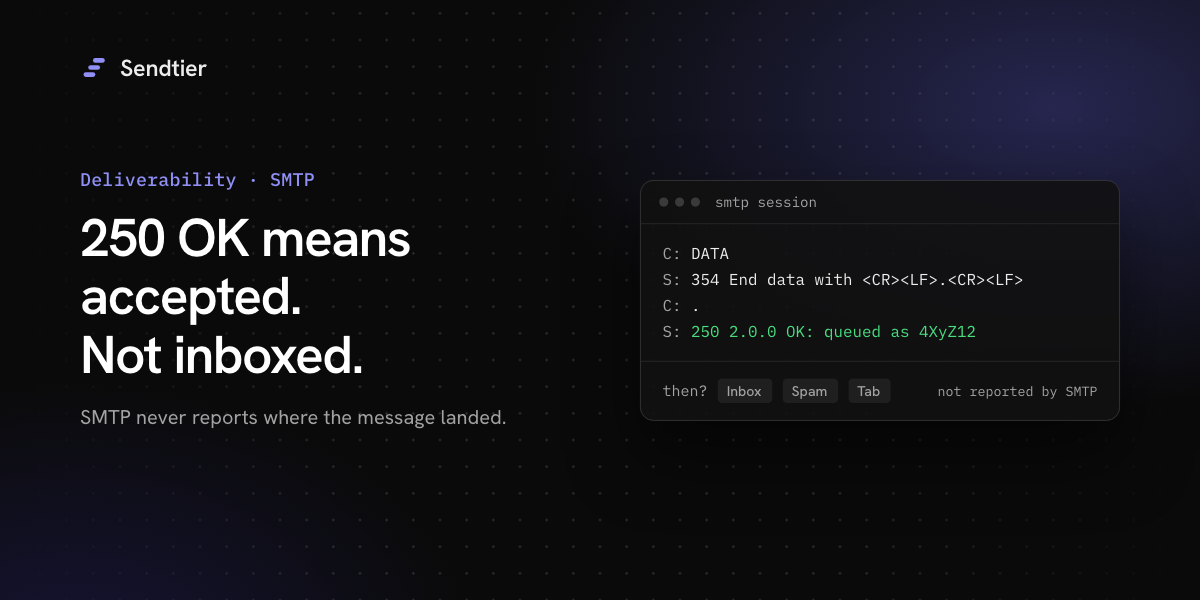
Email APIs report a status called "delivered", and it answers a narrow question. It means that the receiving mail server accepted the message. It does not say whether the message went to the inbox, the spam folder or a tab, or whether anyone saw it.
What a 250 reply means
At the end of an SMTP session, the sending server transmits the message and the receiving server replies with a code. A successful exchange ends like this (the queue ID is an example):
RFC 5321 §6.1 says that when a server accepts a message this way, it takes on responsibility for delivering or relaying it. If that later fails, the server normally sends a failure notice back. There are exceptions: no notice goes to an empty return path, and §6.2 allows a server to drop some messages silently, for example clear abuse. So 250 is a handover of responsibility, not a promise that every later failure produces a bounce. It is the last thing the sender learns over SMTP.
What happens after 250
After the handover, the mailbox provider runs its own filters and decides where the message goes. Nothing in SMTP reports that decision back. Two things can still happen that the sender sees:
- A late bounce. The receiving system can accept the message and reject it later, for example when the mailbox turns out not to exist on an internal server. The bounce then arrives as a separate message to the return path.
- A complaint. The recipient can mark the message as spam days later. Some providers send a report, and Gmail does not (see Gmail's 0.1 % and 0.3 % spam rate lines).
SMTP replies do not report placement. Any "inbox rate" calculated from SMTP replies alone is an estimate.
Signals that measure placement
Some signals come from the receiving side and are measured, not guessed.
- Google Postmaster Tools shows the spam rate that Gmail users report, and authentication results for your domain. It covers DKIM-authenticated mail to Gmail, updates daily and may skip low-volume days (Postmaster Tools dashboards).
- Microsoft SNDS shows data for IP addresses, and Microsoft grants access only for IPs the requester is responsible for (SNDS). If you send through a provider's shared IPs, the provider holds that data, not you.
- Seed tests. Send the real message to test mailboxes that you control at each large provider and look where it lands. This is a direct check of placement, and it measures your test mailboxes, not your recipients.
- Complaint feedback loops. Senders who enrol with Yahoo or Microsoft can receive individual reports for spam complaints. Each provider decides which complaints it reports.
Read them together. A high share of accepted messages next to a rising spam rate in Postmaster Tools is a warning to investigate. It does not prove that filtering has started, and filtering can even make the displayed spam rate fall, because mail in the spam folder leaves the denominator.
Why opens are not a placement signal
Open tracking adds a small remote image to the message and counts each download as an open. Two features of Apple Mail break that count:
- With Mail Privacy Protection, Apple Mail downloads remote content privately in the background when a message arrives, not when the person views it. Apple routes the download through relays that hide the person's IP address (Apple privacy page).
- Apple Mail can also block all remote content.
From those two behaviours we infer that opens can be counted for mail nobody read, and missed for mail somebody did read. An open rate can show a trend in one audience. It does not show where a message landed.
What to do
- Store the server reply for each recipient. When a provider starts to defer or reject, the reply text says why.
- Alert on trends in deferrals and bounces, not on a single event.
- Read Postmaster Tools every day for the domains you send from.
- Run a seed test before large changes, such as a new template, a new sending domain or a new provider.
- Treat a complaint as a stop signal for that address.
What Sendtier does
Sendtier records what its mail server learns about each message and shows it on the email. Every live email.delivered event carries the receiving server's reply in smtp_response. A bounce carries bounce_type (Permanent or Transient) and, for each recipient, the enhanced status and the diagnostic_code text. A deferral (email.delayed) carries the reply in recipients[].diagnostic_code. Late bounces that arrive after a 250 also become email.bounced events.
Read an email and its events with a key that has the full scope:
The response includes an events array. A delivered live email has an event like this one (trimmed, with example values):
The same events reach your webhook endpoints, signed with your endpoint secret. Test-mode emails are never delivered, so they have no MTA events and no smtp_response.
What Sendtier does not do yet
- No placement measurement. Inbox placement is coming soon, and today Sendtier reports acceptance, deferrals, bounces and complaints only.
- No open or click tracking. Sendtier adds no tracking image and does not rewrite links, so it creates no
email.openedoremail.clickedevents. - No delivery-rate numbers in the API.
- No time-to-inbox metric. The
email.deliveredevent has aprocessing_time_msfield that is always0today. It is not a measurement.
Sources were checked on 15 October 2026: RFC 5321, Postmaster Tools dashboards, Microsoft SNDS, Apple Mail privacy settings and Apple Mail Privacy Protection.