Gmail's 0.1 % and 0.3 % spam rate lines
What Gmail's spam rate measures, why it moves faster than you expect, what happens above 0.3 %, and where complaint data comes from.
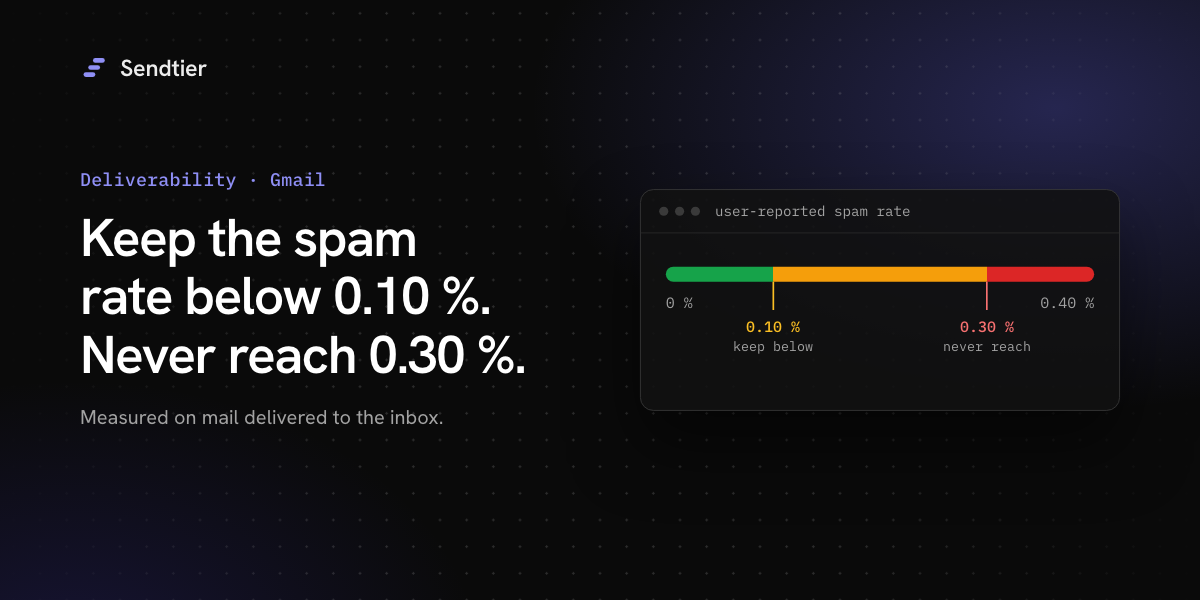
Google publishes two numbers for the spam rate that Gmail users report: keep it below 0.10 %, and never let it reach 0.30 % (email sender guidelines). Both numbers are small, and the rate behind them is easy to misread. This post explains what Gmail measures, why the rate can jump, and what you can see as a sender.
Who the thresholds apply to
The guidelines apply to everyone who sends to personal Gmail accounts. A stricter set of requirements applies to bulk senders. Google's FAQ defines a bulk sender as one that sends close to 5,000 messages or more to personal Gmail accounts within 24 hours. Messages from the same primary domain count together, including its subdomains. Once a domain is classified as a bulk sender, the classification is permanent.
For all senders, the guidelines say to keep the spam rate in Postmaster Tools below 0.3 %. For bulk senders, the FAQ adds that a user-reported spam rate above 0.1 % has a negative impact on inbox delivery.
What the spam rate measures
Postmaster Tools defines the spam rate as the share of messages delivered to the inbox of engaged recipients that those recipients then mark as spam. A few details follow from that definition:
- The denominator is inbox mail, not sent mail. Messages that Gmail put in the spam folder are not in it, unless the recipient marks them as not spam: those count as delivered to the inbox.
- It counts user reports only. Messages that Gmail's filters mark as spam are not user reports.
- It covers DKIM-authenticated mail. The dashboard reports on messages with a DKIM signature.
- It is not real time. Google calculates it daily, and the data usually appears within 24 hours, sometimes later. On days with low volume, the dashboard may show no data.
Because the denominator is inbox mail, the rate can rise when placement gets worse, even if people complain at the same pace. Here is an illustration with round, made-up numbers. A sender gets 10,000 messages into Gmail inboxes and 8 users mark them as spam: 0.08 %. Next week, filtering moves 2,000 of those messages to the spam folder. The same 8 reports over 8,000 inbox messages are now 0.10 %.
What happens above 0.3 %
The FAQ says that bulk senders with a user-reported spam rate above 0.3 % are not eligible for mitigation. Mitigation is Google's help with delivery problems. A sender becomes eligible again when the spam rate stays below 0.3 % for 7 days in a row, and the sender must still meet all the other sender requirements.
Yahoo asks all senders to keep the spam rate below 0.3 %, and also calculates the rate on mail delivered to the inbox.
Where complaint data comes from
When a recipient clicks "Report spam", the mailbox provider decides what to tell the sender. Providers differ here.
- Gmail does not send a report for each complaint. Its Feedback Loop gives aggregate data in Postmaster Tools, grouped by a
Feedback-IDheader that the sender adds and signs with DKIM. - Yahoo runs a complaint feedback loop (CFL) for DKIM-signed mail, and its best practices say an active CFL is needed for all DKIM domains.
- Microsoft runs a junk mail reporting program through SNDS. SNDS gives data for IP addresses that the requester is responsible for.
Senders who enrol in these feedback loops can receive individual complaint reports in the Abuse Reporting Format (ARF). A provider decides which complaints it reports, so the reports are a signal, not a complete count. Gmail sends no individual reports at all, so for Gmail users Postmaster Tools is the only source.
What to do
- Register your domain in Postmaster Tools and check the spam rate every day, together with the authentication dashboards. A rising rate shows up there about a day later.
- Separate your mail streams. Send password resets and receipts from a different subdomain than newsletters, so you can monitor and fix each stream on its own. This does not isolate them for Gmail's rules: Google counts mail from the same primary domain together, subdomains included.
- Make marketing mail easy to leave. Google and Yahoo require bulk senders to support one-click unsubscribe for marketing and subscribed messages. A visible unsubscribe link costs less than a spam report.
- Stop sending to people who complain. A complaint is a clear signal. Keep a suppression list and check it before every send.
- Send only what people asked for. Do not add marketing to a receipt, and do not send the same notice several times.
What Sendtier does
When a mailbox provider sends a feedback loop report to Sendtier's mail server, the report counts only if its trace data matches a message that Sendtier sent to that recipient. A matching report becomes an email.complained event on the email, and Sendtier then:
- adds the address to your account's suppression list with the reason
complaint; - adds a global suppression, so no Sendtier account can send to that address again. The global entry is not listed or deletable through the API;
- returns
422 recipient_suppressedfor any later send to that address, before the email is stored.
During Sendtier's sending warm-up, daily caps for live sending rise in steps. After the first live step, an account whose bounces reach 2 % or whose complaints reach 0.1 % of its accepted live recipients over the previous 7 days can be held one step lower. Plan caps still apply, and the lower of the two limits wins. Test mode does not follow the warm-up. This is Sendtier's own measure, based on accepted recipients. It is not Gmail's spam rate, which is based on inbox mail.
What Sendtier does not do yet
- Sendtier does not show a complaint rate to customers. The deliverability screen does not have that number yet.
- Sendtier does not add a
Feedback-IDheader, so it cannot give you Gmail Feedback Loop data per sender. Use Postmaster Tools for your own domain. - Sendtier does not pause an account automatically when complaints rise.
- Sendtier does not track opens or clicks, so it creates no
email.openedoremail.clickedevents.
Sources were checked on 15 October 2026: Google email sender guidelines, Google sender guidelines FAQ, Postmaster Tools dashboards, Gmail Feedback Loop, Yahoo sender best practices and Microsoft SNDS.